

How To Create Asm Instance In Oracle 11gr2
An Oracle ASM can be used for standby operation.
S tandby operation
Create an Oracle ASM instance resource.
The Oracle ASM instance will not be monitored, but only started or stopped. If the Oracle ASM instance fails, an Oracle instance resource error will be detected, so userApplication will be switched to the standby node, and ongoing operations will never be disrupted.
For Oracle Database 11g R1, refer to "2.3.2.1 Environment configuration with Oracle Database 11g R1" and for Oracle Database 11g R2/12c R1, refer to "2.3.2.2 Environment configuration with Oracle Database 11g R2/12c R1".
Notes in the case of using Oracle ASM of Oracle Database 11g R1 in standby operation are as follows.
Creation and configuration of Oracle ASM instances
-
Operation node
The Oracle ASM instance and database are only created on the operating node. The standby nodes will only operate the database on the shared disk of the operating node.
Note
-
An Oracle ASM instance name must begin with "+". The default name is "+ASM".
If multiple Oracle ASM instances are configured on one server, a different Oracle ASM instance name must be assigned for each Oracle ASM instance. -
If multiple Oracle homes are configured on one server, a different Oracle instance name must be assigned for each Oracle home.
-
Create the Oracle ASM instance and the Oracle database. The relation between the Oracle ASM instance and the database should become 1:1.
-
Oracle ASM instance : database = 1:1
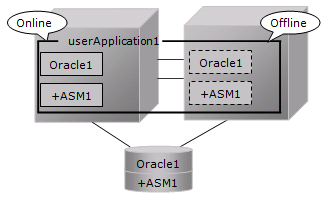
-
Oracle ASM instance : database = 1:n
The following figure shows an example that Oracle ASM instance : database = 1:2.
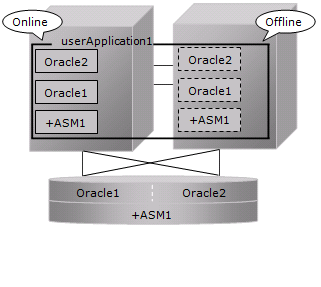
-
-
In mutual standby operation and N:1 standby operation, the relation between Oracle ASM instance and database should become 1:1 or 1:n on each userApplication.
-
Mutual standby
The following figure shows an example that Oracle ASM instance : database = 1:1 on each userApplication.
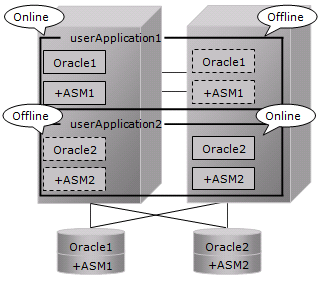
-
N:1 standby
The following figure shows an example that Oracle ASM instance : database = 1:2 on each userApplication.
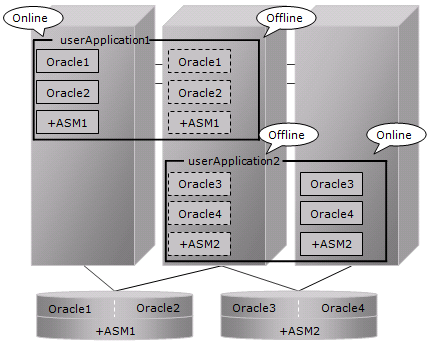
-
See
Refer to the Oracle Database manual.
-
-
Standby node
Set up the standby nodes in the same configuration (directory creation, file copy, and links) as the operating node where the AMS instance and database are created.
-
Under $ORACLE_HOME/dbs
-
Under $ORACLE_BASE/admin/$ORACLE_SID
-
$ORACLE_BASE/admin/< Oracle ASM instance name>
-
$ORACLE_BASE/diag/asm
The access privilege to the directories and files must be also the same as that on the operating node.
If you set where archive log is output on the operating node, it is necessary to set the same on the standby nodes.CSS on the standby node must be set and started by manually, though CSS on the operating node is set and started automatically while Oracle database is being created.
Note
If required files on the operating node are backed up in the tar format with "cloracpy"(refer to "4.4 cloracpy - Create Backup File for Oracle Database Setup") command, configuration information of the Oracle ASM instance will not be backed up. Copy the following file manually in the tar format:
-
$ORACLE_BASE/admin/<Oracle ASM instance name>
-
Oracle ASM initialization parameter check
Check if the disk group in which the Oracle database is created is set for the Oracle ASM instance initialization parameter "ASM_DISKGROUPS".
See
For the initialized parameter of the Oracle ASM instance, refer to the Oracle Database manual.
userApplication creation
When creating userApplication, create an Oracle ASM instance resource and Oracle instance resource. Register them in the same Oracle resource.
Information
-
For information on how to create Oracle ASM instance resource, refer to "2.2.7.1 Oracle Resource Creation and Registration".
-
The NULLDETECTOR attribute is automatically set to the flag of the Oracle ASM instance resource. This value cannot be changed.
Notes in the case of using Oracle ASM of Oracle Database 11g R2/12c R1 in standby operation are as follows.
Supported Configurations
In order to use Oracle ASM of Oracle Database 11g R2/12c R1, it is necessary to install Oracle Grid Infrastructure. When installing Oracle Grid Infrastructure, the composition which separates the installation user of Oracle Database and the installation user of Oracle Grid Infrastructure is supported. The composition which creating one user is not supported.
A different directory must be assigned respectively for an ORACLE_BASE of the installation user of Oracle Database and an ORACLE_BASE of the installation user of Oracle Grid Infrastructure.
Oracle Grid Infrastructure Installation and Oracle ASM instance, Oracle Database Creation
See "Appendix C Oracle Grid Infrastructure Installation and Oracle ASM instance, Oracle Database Creation" to install Oracle Grid Infrastructure and create Oracle ASM instance, Oracle Database.
Note
-
An Oracle ASM instance name must begin with "+". The default name is "+ASM".
-
If multiple Oracle homes are configured on one server, a different Oracle instance name must be assigned for each Oracle home.
-
The relation between Oracle ASM instance and database should become 1:1 or 1:n.
-
Oracle ASM instance : database = 1:1
-
An Oracle ASM instance : database = 1:n
The following figure shows an example that Oracle ASM instance : database = 1:2.
-
-
The following configuration of standby operation using Oracle ASM 11g R2/12c R1 is supported.
-
1:1 standby
The following configuration of standby operation using Oracle ASM 11g R2/12c R1 is not supported.
-
Cascade
-
Mutual standby
-
N:1 standby
-
Priority transfer
-
N:M standby
-
-
When using Oracle ASM of Oracle Database 11g R2/12c R1 in standby operation, database services are is not available.
See
Refer to the Oracle Database manual.
Change Oracle Restart Settings
Change the settings of Oracle Restart to control Oracle ASM by PRIMECLUSTER Wizard for Oracle.
-
Oracle Database 11g R2/12c R1(12.1.0.1)
Execute the following command on each node with Grid user access privileges to set for Oracle Restart and the CSS(Cluster Services Synchronization) daemon to start when OS starts, and disable automatic startup of Oracle instances, Oracle listener, and Oracle ASM.
| Component | Command |
|---|---|
| Oracle Restart | crsctl enable has |
| CSS | crsctl modify resource ora.cssd -attr "AUTO_START=always" |
| Oracle ASM | srvctl disable asm |
| Oracle listener | srvctl disable listener [-l <listener_name>] |
| Oracle instance | srvctl disable database -d <db_unique_name> |
-
Oracle Database 12c R1 PSR12.1.0.2 or later
Execute the following command on each node with Grid user access privileges to set for Oracle Restart to start when OS starts, and disable automatic startup of Oracle instances, Oracle listener, and Oracle ASM.
| Component | Command |
|---|---|
| Oracle Restart | crsctl enable has |
| Oracle ASM | srvctl disable asm |
| Oracle listener | srvctl disable listener [-l <listener_name>] |
| Oracle instance | srvctl disable database -d <db_unique_name> |
userApplication Create
When creating userApplication, create an Oracle ASM instance resource and Oracle instance resource. Register them in the same Oracle resource.
Information
-
For further details of registering Oracle ASM instance in a Oracle resource, refer to step 5 of "2.2.7.1 Oracle Resource Creation and Registration"
-
The NULLDETECTOR attribute is automatically set to the flag of the Oracle ASM instance resource. This value cannot be changed.
Note
-
Set up Grid user to Oracle ASM instance resource and Oracle listener resource, Oracle user to Oracle instance resource.
-
In case of Oracle Database 11g R2/12c R1(12.1.0.1), set up the following script in PreOnlineScript of the Oracle ASM instance resource to start Oracle ASM after CSS started.
/opt/FJSVclora/sbin/cloracsswait <Grid user>
A disk group that is used for the Oracle ASM instance must not be mounted or unmounted manually. For the disk group is mounted, the following message might be output to the console when the Oracle ASM resource is activated, but no action needs to be taken.
-
ORA-15032: not all alterations performed
-
ORA-15017: diskgroup "diskgroup name" cannot be mounted
-
ORA-15030: diskgroup name "diskgroup name" is in use by another diskgroup
How To Create Asm Instance In Oracle 11gr2
Source: http://software.fujitsu.com/jp/manual/manualfiles/m150006/j2ul1679/03enz200/j1679-00-02-03-02.html
Posted by: bonetond1972.blogspot.com
0 Response to "How To Create Asm Instance In Oracle 11gr2"
Post a Comment